changelog.exe

Changelog

Your clients can now get support in Microsoft Teams

Your clients can now get support in Microsoft Teams, with the Teams icon

Your clients already work in Microsoft Teams. Now they can get support there too, from an app with your name on it, while your team keeps working in ConnectWise or HaloPSA.

Every ticket gets its own Teams chat

Clients ask for help by sending a message, the way they would message a colleague. Each request gets its own chat, so they can follow progress and check on any open ticket without emailing or calling.

Offer Teams support under your own brand

Clients see your name and logo, so support in Teams feels like part of the service they already pay you for. You can brand it differently for each client.

Every reply lands on the ticket

Everything a client says in Teams is on the ticket, and your technicians answer from the PSA the way they do today. Internal notes stay internal.

Roll it out one client at a time

Turn it on for the clients who live in Teams and leave the rest as they are. Each client's Microsoft 365 admin approves it once.


Weekly release: Oct 12, 2026

Weekly release, Oct 12 2026

Check Sophos firewalls and Axcient backups from the ticket

The agent can now check Sophos Central and Axcient x360Recover when a "firewall lost connection" or "replication failed" alert lands, so its note says whether the device is back online or still down. Both connections are read-only. Connect them in Integrations.

Look up DNS, mail records, and certificates for any domain

On website-down, certificate-expiry, and spoofing tickets, the agent checks DNS, SPF, DKIM, and DMARC records, TLS certificates, and domain registration itself. You can also ask Chat to check DMARC across every client.

Trace messages and restore files in Microsoft 365

The agent can now trace messages, list mailbox permissions, read Conditional Access policies, and browse SharePoint and OneDrive in Microsoft 365. With your approval, it also restores deleted files and changes folder access.

Promote a client Workflow to every client

You can now roll a Workflow you built for one client out to all of them, and it keeps its run history. Before you confirm, you see which steps will run without approval on every client. Open the Workflow and click Promote to all clients.

More improvements

  • Any technician can now approve a plan on a ConnectWise ticket with no owner.
  • Script approvals now include a plain-language summary of what the script will do.
  • The agent now reads screenshots attached to tickets, so an error that only exists in an image is part of the diagnosis.
  • When the same alert comes in from many clients at once, the agent checks the vendor or ISP side first and keeps each note short.

Weekly release: Oct 5, 2026

Weekly release, Oct 5 2026

Run audits and reports across every client in Chat

We've made Chat much faster at work that spans all your clients. Ask for a license audit, a device inventory, or a count across clients, and the agent writes a script that pulls the data and hands you a CSV. When something needs fixing, it shows a dry run first, and one approval covers every client.

We also added a few smaller upgrades:

  • Approve or deny a plan with one click.
  • List tickets across every client in ConnectWise, HaloPSA, Autotask, or SuperOps.

Fix device issues right from the ticket

The agent can now run a PowerShell or Bash script on the affected device through NinjaOne or ConnectWise RMM, with a technician's approval, so fewer tickets get handed back. In a Workflow, an admin can let routine scripts run on their own once they pass review. Turn it off per RMM connection in Integrations.

Add If/Else branches to your Workflows

Workflows just got smarter. Add an If/Else step and the agent checks a plain-English condition, like which roles a server has, then follows the YES or NO path. Add one from the + in any Workflow, or describe it when you create one.

More improvements

  • The agent can delete Microsoft 365 users and set up DKIM, with your approval.
  • The agent can open new ConnectWise tickets, with your approval.
  • We now guide you through ConnectWise setup, step by step.
  • The agent finds Hudu assets by identifiers like circuit IDs.
  • Long ConnectWise and Hudu lists no longer get cut off.
  • Expired NinjaOne connections now show in Integrations.

Weekly release: Sep 21, 2026

Weekly release, Sep 21 2026, with a ticket card asking Rallied to build an offboarding Workflow

The new Workflow editor

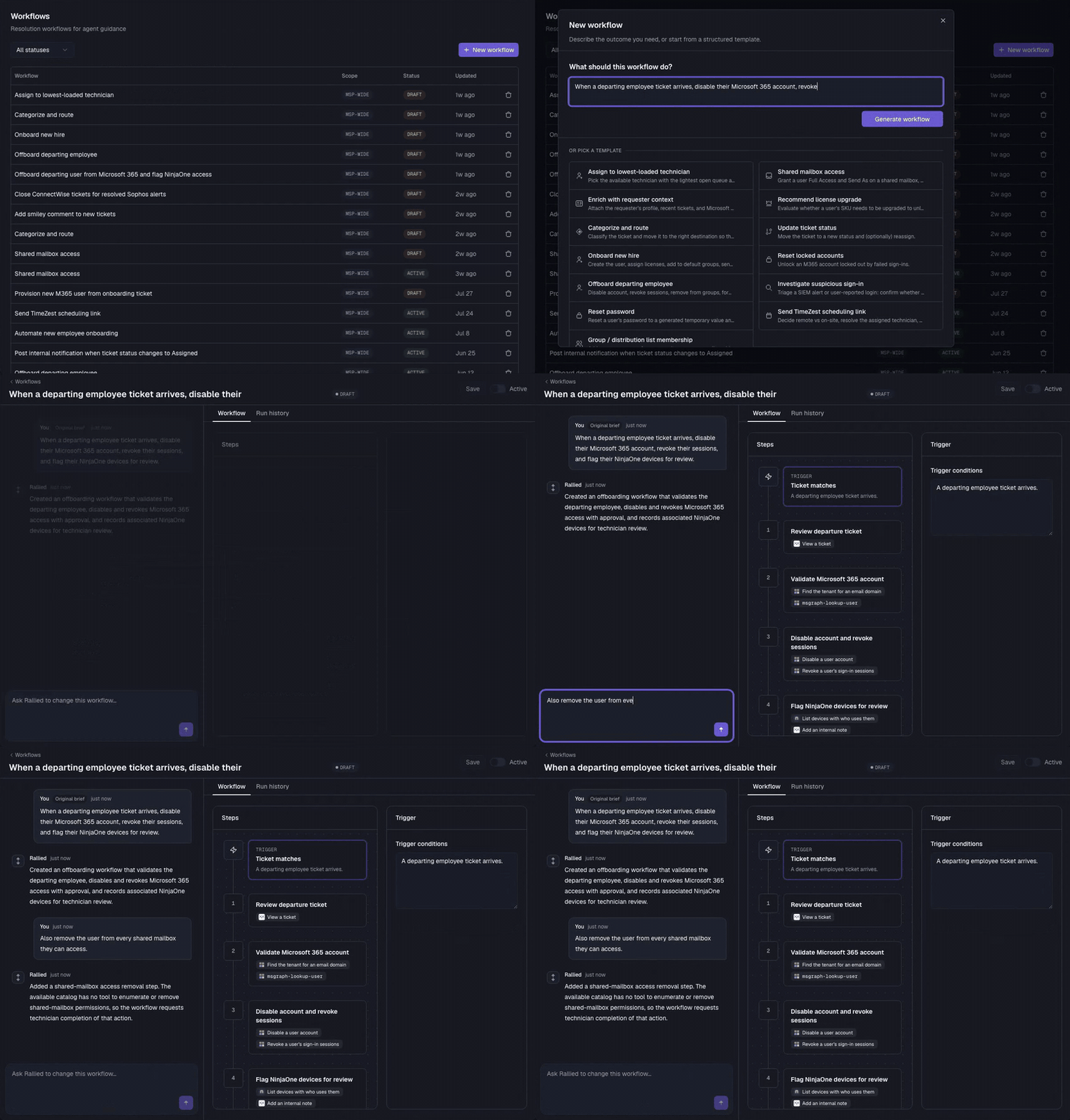
The new editor replaces the old text editor. Describe what you want in plain language and Rallied drafts the Workflow as a trigger and a sequence of steps. Change it by chatting, or edit any step yourself. You can also start from a template.

  • Each step holds plain-language instructions and tools picked from your connected integrations.
  • A Run history tab lists the tickets the Workflow ran on.

Existing Workflows keep running and convert to steps when you open them. Open Workflows from the sidebar and click New workflow.

Typing a plain-language prompt into New workflow, Rallied generating the trigger and steps, then a chat message adding a shared mailbox step

Ticket attachments

The agent reads the text of PDF, DOCX, and EML files attached to a ticket in ConnectWise, HaloPSA, or Autotask.

New integrations

  • Check Point Email Security (Avanan). The agent restores quarantined email and manages exceptions per client.
  • Password Pusher, for one-view links in password resets and onboarding.
  • SharePoint on Microsoft 365.

Connect them from Integrations.

Weekly release: Sep 11, 2026

Weekly release, Sep 11 2026, with a ticket card

The agent can now manage mailbox forwarding and inbox rules on Microsoft 365. This release also adds ticket history to every Workflow, and four fixes.

Microsoft 365 mailbox forwarding

Set and clear mailbox forwarding, and list and remove inbox rules, on any Microsoft 365 tenant connected directly to Rallied.

  • Forward a mailbox to another address, or remove forwarding that is already set.
  • List the inbox rules on a mailbox and remove the ones that forward mail out.

Ticket history on Workflows

Every Workflow now lists the tickets it ran on, so you can see what a pre-approved Workflow actually did. Each row shows the client, the ticket, how many steps the agent ran, and the outcome: changes made, failed, or read-only. Rows open the ticket in ConnectWise, HaloPSA, or Autotask.

More in this release

  • The agent no longer posts notes that repeat a technician's own update.
  • Sensitive requests from unverified requesters now get a plan to approve, marked as unverified, instead of stopping.
  • CIPP can be connected, edited, and disconnected without Microsoft 365 connected.
  • Renaming a company in your PSA no longer creates a duplicate client in Rallied.

Weekly release: Sep 3, 2026

Weekly release, Sep 3 2026, with a ticket card showing the agent checking an Outlook outage

Your agent now searches the web before it answers, and it learns from every ticket it closes.

Searches the web before it answers

When someone reports that Outlook is down, the agent can now check Microsoft's status page and tell them whether it is a known outage before anyone starts troubleshooting. The same goes for licensing questions, vendor documentation, and security terms: it reads the source instead of guessing.

Learns from every ticket it closes

Rallied now picks up what is specific to each client as it works: which server to restart when Sage 50 loses its licences, who signs off on access requests, how a site names its machines. Each one lands in Memories as a proposal, and nothing is used until you accept it. Open Memories from the sidebar and click Accept or Dismiss. (The more tickets it closes, the less your team repeats itself.)

See Rallied in Action

Rallied resolves L1 tickets end-to-end. Password resets, account unlocks, onboarding — handled in minutes, not hours.