Syncro pricing in 2026: what it actually costs (and what to think about before you commit)

TL;DR
Syncro charges $129/technician/month (Core, annual) or $179/technician/month (Team, annual). Endpoints are unlimited - no per-device fee regardless of how many clients you manage. The big decision is whether you need the M365 security module: if you do, Team is the only option. If you don't, Core is a full-featured RMM + PSA at a price that's hard to beat vs running those tools separately. Annual billing saves $30/technician/month vs monthly. A 3-person shop on Team (annual) pays $6,444/year all-in - roughly what a mid-tier standalone PSA costs alone. If your client base is scaling fast, the per-technician model is where Syncro gets genuinely compelling.
The MSP software market has a pricing problem. Most vendors - especially on the RMM side - have historically charged per endpoint, per agent, or per some unit that penalizes you for growing your client base. The more clients you win, the higher your tooling bill, which slowly erodes your margins.
Syncro took a different approach: charge per technician, bundle everything (RMM + PSA + remote access) into one fee, and let you scale endpoints as far as you want without the bill moving. Whether that model actually saves you money depends on where you are in your MSP journey. Let's go through the real numbers.
What Syncro actually costs: the full pricing breakdown
Syncro has two plans for MSPs, both available on annual or monthly billing. There are no feature-restricted "starter" or "lite" tiers - Core is a complete RMM and PSA, not a watered-down entry point.
Core Plan - $129/technician/month (annual)
The Core Plan at $129/technician/month on annual billing ($159/month on monthly) is Syncro's full RMM + PSA bundle. Here's what's in every Core seat:
| Category | What's included |
|---|---|
| RMM | Unlimited Windows, Mac, server, and network device endpoints; automated patch management; custom alert profiles; policy inheritance; scripting engine with pre-built library |
| PSA | Ticketing, SLA enforcement, estimates, invoicing, recurring billing automation, branded client portal, inventory management, live chat, Power BI templates |
| Remote access | Splashtop remote desktop (included, no per-session charge), file transfer, PowerShell/command-line access |
| Integrations | API access, Pax8, Domotz, Hudu, Zapier, iOS/Android mobile apps |
| Support | 24/5 live support, knowledge base, community forum |
What Core does not include: Microsoft 365 security management, real-time ticket automations, session recording, network discovery, or advanced identity governance. If those aren't part of your service stack, Core gives you everything most MSPs run day-to-day.
Team Plan - $179/technician/month (annual)
Team at $179/technician/month annually ($209/month on monthly) adds the full M365 security module on top of everything in Core.
The additions that matter most:
Microsoft 365 security and identity
- Entra ID sync across all client tenants from a single dashboard
- In-platform actions: password reset, MFA reset, user block, session revoke - no tab-switching required
- Automated M365 license consumption tracking and per-client billing
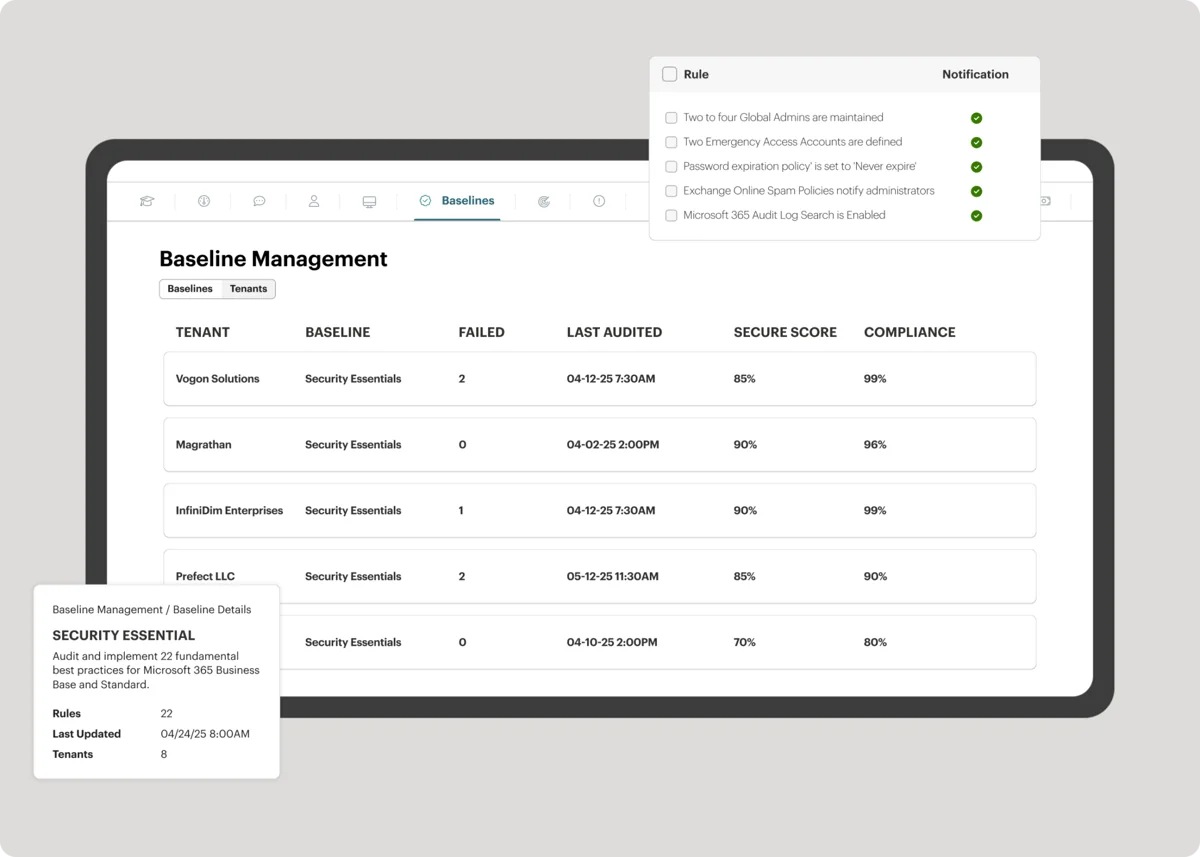
- CIS-aligned security baselines - assess and benchmark each client tenant
- Configuration drift detection and real-time alerts
- Consolidated security posture scoring per client
- Branded, white-labeled security assessment reports you can hand to clients

Advanced ticketing and platform features
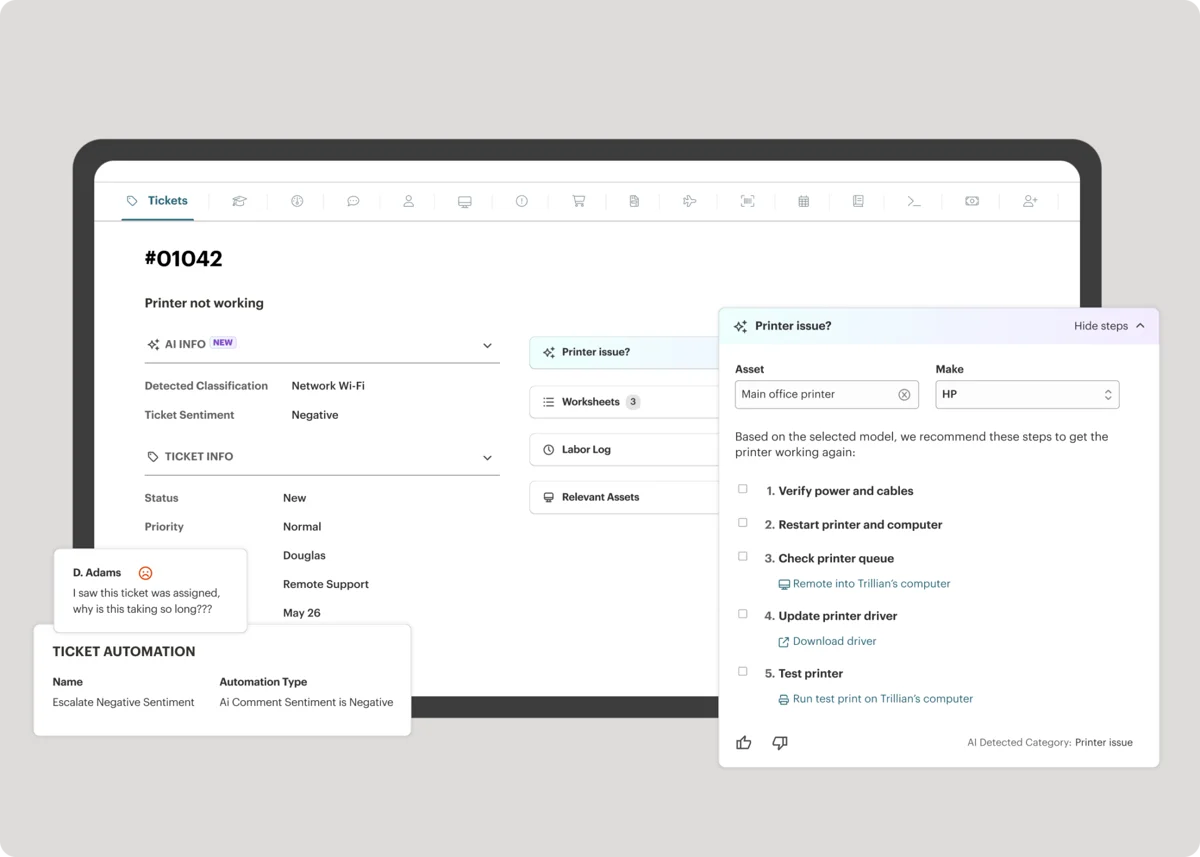
- Real-time ticket automations (route, escalate, enforce SLAs as tickets arrive - not on a schedule)
- Live ticket view metrics dashboard showing queue health, technician workload, and SLA status in real time
- Network discovery - continuously scans client networks for unmanaged devices
- Asset warranty tracking for hardware refresh conversations
- Session recording for audit-compliant remote session logs
Add-on: M365 Cloud Backup - $1.90/user/month
Syncro offers one add-on: M365 Cloud Backup at $1.90/user/month. This covers comprehensive backup across Exchange, SharePoint, OneDrive, Teams, OneNote, Lists, Planner, and Entra ID - with unlimited storage, granular recovery, and regional data residency options (US, Canada, UK, Australia). It's a separate SKU from the security module, so you can run backup without Team, or Team without backup.

Full pricing table
| Plan | Annual | Monthly | Free trial |
|---|---|---|---|
| Core | $129/tech/month | $159/tech/month | 14 days, no card |
| Team | $179/tech/month | $209/tech/month | 14 days, no card |
| M365 Cloud Backup (add-on) | $1.90/user/month | $1.90/user/month | - |
The per-technician model: why it matters
The most important thing to understand about Syncro's pricing is that endpoints don't cost extra. You pay per technician seat, and you can manage as many Windows machines, Macs, servers, and network devices as you want.

That's a meaningful structural difference. Legacy RMM tools typically charge per managed endpoint - so winning a new client with 50 devices immediately raises your tooling cost. Syncro's model keeps that bill flat until you hire another technician.
For a growing MSP, the math can swing pretty dramatically:
- 3 technicians managing 50 endpoints: Syncro Core costs $387/month
- 3 technicians managing 500 endpoints: Syncro Core still costs $387/month
The same 3-person team managing 500 endpoints on a $5/endpoint/month legacy RMM would be paying $2,500/month for the RMM alone - before PSA or remote access. That's the consolidation argument in plain numbers.
Where this gets less clean: if you're a large-team shop with relatively few managed endpoints per technician, you're subsidizing the per-endpoint users who get more value from flat pricing. The model rewards MSPs who run lean technician headcounts against large client bases.
Annual vs monthly: the $30/technician/month question
Syncro charges $159/month (Core) or $209/month (Team) for month-to-month billing. Annual pricing drops that to $129 or $179 - a saving of $30/technician/month, or about 19% on Core and 14% on Team.

For a 3-technician team, that's $1,080/year on Core or Team - not nothing. The trade-off is committing to a 12-month term before you've fully stress-tested the platform. Given that Syncro offers a 14-day free trial with full feature access, most MSPs would start there, run a real evaluation, and then decide on annual vs monthly.
Syncro has earned G2's Fastest Implementation and Most Implementable badges, and most shops are operational within 48-72 hours of starting a trial. If you can reach that point within two weeks, the trial window gives you a fair read before the annual decision.
What it actually costs: worked examples
Small MSP: 2 technicians, Core Plan (annual)
| Item | Qty | Per unit | Monthly | Annual |
|---|---|---|---|---|
| Core Plan seats | 2 | $129 | $258 | $3,096 |
| M365 Cloud Backup (optional) | 2 | $1.90 | $3.80 | $45.60 |
| Total (without backup) | - | - | $258 | $3,096 |
| Total (with backup) | - | - | $261.80 | $3,141.60 |
Growing MSP: 4 technicians, Team Plan (annual)
| Item | Qty | Per unit | Monthly | Annual |
|---|---|---|---|---|
| Team Plan seats | 4 | $179 | $716 | $8,592 |
| M365 Cloud Backup (optional) | 4 | $1.90 | $7.60 | $91.20 |
| Total (without backup) | - | - | $716 | $8,592 |
| Total (with backup) | - | - | $723.60 | $8,683.20 |
Consolidation comparison: 3 technicians, Team Plan vs running tools separately
| Tool | Syncro (Team, annual) | Separate tools (est.) |
|---|---|---|
| RMM | Included | $300-500+/month |
| PSA | Included | $150-300+/month |
| Remote access | Included (Splashtop) | $45/month (3 users) |
| M365 security | Included | $200-400+/month |
| Total | $537/month | $695-1,245+/month |
"I use Syncro for technical IT support and remote management, and it saves the headache of using multiple platforms by having everything we need in one place. The costs are lower compared to what we used before, while the solution is the same, if not better." - Verified User, G2 review

Core vs Team: which plan do you actually need?
The short version: it's almost entirely about whether you want to manage M365 security inside Syncro.
Go with Core if:
- Your M365 management happens through a separate security tool (or not at all yet)
- You're a small shop wanting the full RMM + PSA experience without paying for security features you won't use
- You want to start lean and upgrade later if the M365 module becomes relevant
Go with Team if:
- You offer M365 security assessments, baselines, or posture reporting to clients
- You want Entra ID actions (password reset, MFA reset, user block) in-platform without tab-switching
- You want real-time ticket automations rather than scheduled ones
- Session recording matters for your compliance or audit requirements
The $50/technician/month gap between Core and Team is meaningful. For a 3-technician team on annual billing, that's $1,800/year. Whether the M365 security module is worth that depends on how central security services are to your offering.
What the scripting and automation unlock
One thing that doesn't show up directly in the pricing table but shapes the ROI: Syncro's scripting engine. It includes a pre-built PowerShell script library and lets you write and schedule custom scripts across your managed endpoints - Windows 11 readiness checks, temp file cleanup, policy enforcement, you name it.
"The scripting and automation capabilities help standardize processes across all endpoints, simplifying our operations." - Nate F., G2 review
"Syncro's PowerShell capability has opened up a lot of management automation avenues for us... we chose Syncro over other products because of its simplicity, features, and cost." - Chris K., G2 review
That's the kind of automation capability that used to require a dedicated RMM with a separate seat cost. In Syncro, it's just in the box.

The hidden cost to think about
Syncro's pricing is transparent, but there are a few things worth factoring into your total cost of ownership:
Technician headcount is the lever. Unlike per-endpoint tools where client growth drives cost, Syncro's cost scales with your team. If you're planning to grow from 3 to 6 technicians in the next year, that doubles your Syncro bill. Not a problem, just worth modeling.
No per-endpoint model means no natural ceiling for large endpoint counts. If you manage a client with 1,000 endpoints, Syncro is an excellent deal. But the inverse is also true: if your client base is mostly small clients with fewer endpoints per technician, you may be paying for headroom you're not using.
Advanced enterprise customization has limits. Syncro is designed for MSPs, not for MSPs-that-have-become-small-enterprises. If your ops team needs deep custom workflow automation, complex multi-tier SLA configurations, or a PSA that mirrors a bespoke service delivery model, you may hit walls before the pricing becomes the constraint. ConnectWise Manage gives you that depth - at considerably higher cost and implementation effort.
Community support is an asset. Syncro has a genuinely active community forum and script-sharing ecosystem. That reduces the effective training cost and accelerates automation adoption, which indirectly affects your ROI on the tool.
Remote access is included - that matters
One line in the pricing table that tends to get undersold: Splashtop remote desktop access is included in both plans at no per-session or per-seat charge.
Splashtop as a standalone product for 3 technicians runs around $45-60/month. Bundled into Syncro, it just disappears from your bill. If you're currently paying separately for TeamViewer, AnyDesk, or Splashtop, that consolidation alone justifies looking at whether Syncro makes sense.

Who Syncro pricing works best for
Best fit:
- Small to mid-sized MSPs (1-15 technicians) consolidating from 3-5 separate tools
- Teams scaling their endpoint count without wanting their tooling cost to scale alongside it
- Shops that want M365 security baked into the platform rather than bolted on (Team Plan)
- MSPs that value fast implementation - most are operational within 2-3 days of starting a trial
Less ideal:
- Very large MSP teams where per-technician cost accumulates past what bundled-discount enterprise alternatives charge
- Operations that need deep PSA customization or complex multi-tier workflows
- MSPs that already have a mature, separate RMM they're not looking to replace
If you're comparing Syncro to Atera, we've got a full head-to-head breakdown here. The per-technician vs per-endpoint comparison in that piece goes deeper into which pricing model fits which growth trajectory.
Try Rallied
If Syncro is handling your RMM and PSA - managing your endpoints, your ticket queue, your client billing - the next question is what's resolving those tickets. Syncro routes and manages the work; Rallied does the work.
Rallied is an AI technician built for MSPs that autonomously resolves L1 and L2 tickets inside your PSA. It connects directly to your Syncro stack - tickets come in, Rallied reads the ticket, executes the resolution (password reset, account unlock, onboarding, offboarding, endpoint script), and closes it. No workflow builder required, no 6-month implementation. It's $150 a month for 2,000 credits, and each ticket costs 1, 3 or 8 credits depending on how much work the agent did on it, so you pay for work that actually got done.

The combination that's working for MSPs right now: Syncro as the unified management platform, Rallied as the execution layer that actually resolves what lands in the queue. See how Rallied works.
For the wider picture, read Best MSP Software in 2026.
Frequently Asked Questions
How much does Syncro cost per month?
Syncro charges per technician, not per endpoint. The Core Plan is $129/technician/month on annual billing ($159/month on monthly billing). The Team Plan - which adds Microsoft 365 security, real-time automations, session recording, and network discovery - is $179/technician/month annually ($209/month on monthly billing). There's also an optional M365 Cloud Backup add-on at $1.90/user/month. A 3-technician shop on the Team Plan (annual) would pay $6,444/year, or about $537/month.
Does Syncro charge per endpoint or per device?
No - Syncro's pricing is per technician, with unlimited endpoints included in every plan. You can manage as many Windows, Mac, servers, and network devices as you have without any per-device license fee. Adding 100 new client endpoints doesn't raise your Syncro bill; adding a fourth technician does. This makes Syncro cost-predictable as your client base scales.
Is Syncro pricing worth it compared to separate RMM and PSA tools?
For most small to mid-sized MSPs, yes - Syncro bundles RMM, PSA, and Splashtop remote access into a single per-technician fee. Running those three separately through ConnectWise Manage, a standalone RMM, and Splashtop could easily run $2,700+/month for a 3-person team. Syncro's Team Plan for the same team costs $537/month. The consolidation math is usually pretty clear. The caveat: if you need deep PSA customization or enterprise-grade RMM scripting, you may outgrow Syncro before the pricing becomes a concern.
What's the difference between Syncro's Core and Team plans?
Core ($129/tech/month annually) gives you the full RMM and PSA - unlimited endpoints, ticketing, patch management, billing automation, Splashtop remote access, and scripting. Team ($179/tech/month annually) adds everything in Core plus the full Microsoft 365 security suite: Entra ID sync, CIS-aligned security baselines, drift detection, security posture scoring, branded assessment reports, real-time ticket automations, session recording, network discovery, and asset warranty tracking. The choice usually comes down to whether M365 security management is part of your service offering.
Does Syncro offer a free trial?
Yes - Syncro offers a 14-day free trial with no credit card required. You get full access to whichever plan you're evaluating. Syncro has earned G2 badges for Fastest Implementation and Most Implementable, and most MSPs are operational within 48-72 hours of starting a trial. For MSPs evaluating Syncro alongside tools like Atera, the trial is the fastest way to compare the actual technician experience.
