CSP automation for MSPs: what's actually worth automating in 2026
TL;DR
CSP automation is the highest-leverage operational investment most MSPs aren't doing systematically yet. User onboarding and offboarding is where the math is clearest: 20-30 minutes per user, manually, across 20+ customer tenants, is hundreds of hours a month that disappears with automation. Rewst made rule-based MSP automation genuinely accessible, and real MSPs report saving 45-300+ hours per month using it. But rule-based automation has a ceiling - edge cases fall through, every novel situation needs a new rule, and it doesn't touch the helpdesk tickets that land after the workflow runs. Agentic AI, like Rallied, handles both layers: the provisioning workflows and the support tickets, without 100 custom rules and a dedicated admin to maintain them.
Rallied runs these tasks across every customer tenant from the ticket. What it can do in Microsoft 365, action by action, is on the Microsoft 365 automation page.
What "CSP automation" actually means
CSP stands for Cloud Solution Provider - the Microsoft certification that authorizes resellers to provision and manage Microsoft 365 tenants for customers. Every MSP managing M365 at scale is a CSP, whether they've thought of it that way or not.
The "automation" part refers to the operational grunt work those tenants generate:
- Creating and provisioning new users (licenses, groups, mailboxes, Teams, SharePoint)
- Offboarding departing employees cleanly (mailbox archive, license reclaim, group removal, access revocation)
- Managing license consumption and flagging unused seats
- Running compliance and security checks (MFA enforcement, conditional access, retention policies)
- Resolving the support tickets that flow from all of the above - password resets, account unlocks, "I can't log in"
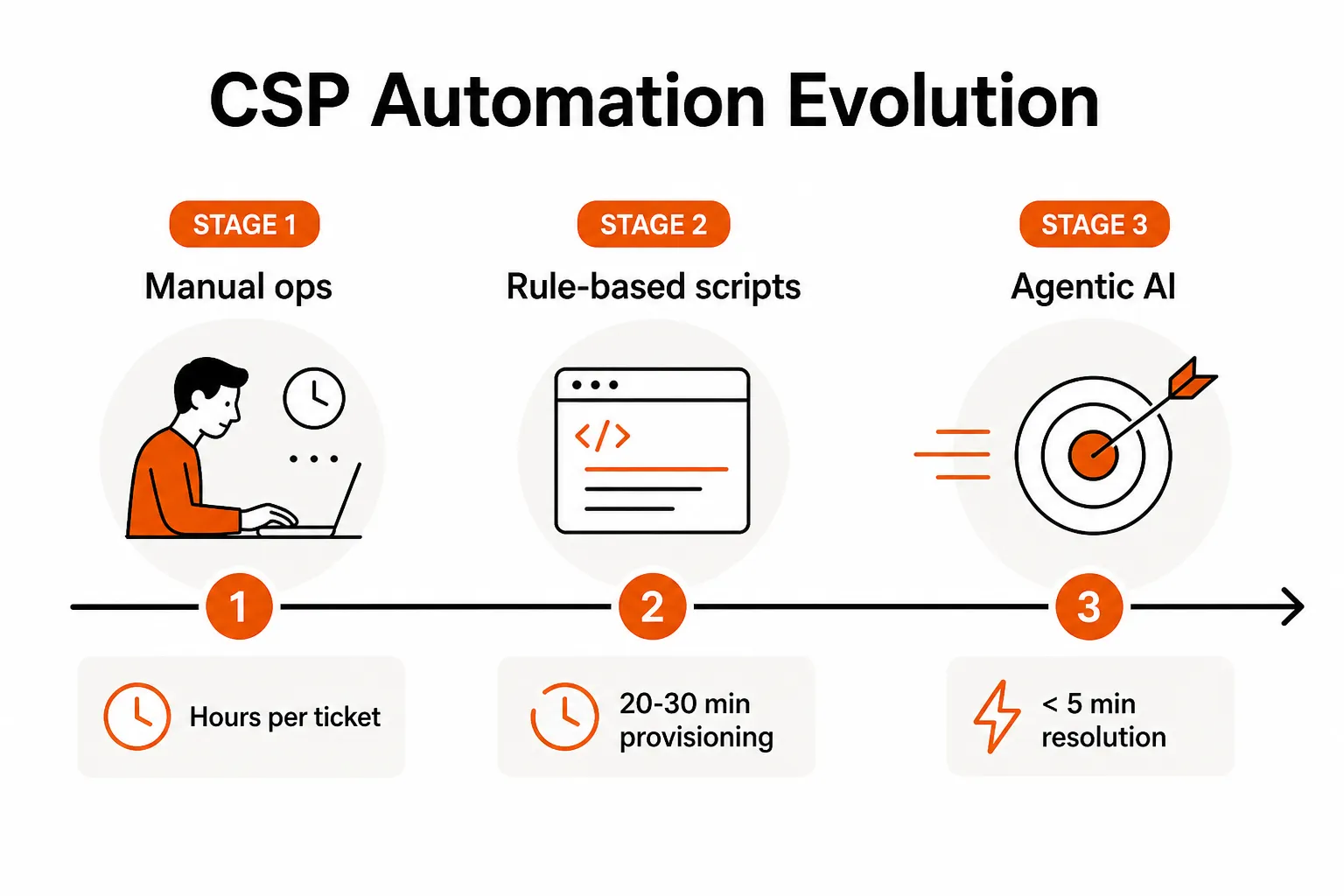
Without automation, each of these touches a human. A password reset takes 6-8 minutes of technician time even when nothing goes wrong, and about $70 fully loaded once the end user's downtime is counted. User onboarding takes 20-30 minutes per person when done manually. For an MSP managing 20-50 customers with 50+ new hires per month across the book, that's 16-25 hours of pure provisioning work - before anything else lands in the queue.
The compounding effect is what makes CSP automation so high-ROI: it's not one task, it's dozens of recurring tasks across every customer, every month.
The five tasks worth automating first
Not all CSP work automates equally. Some tasks are high-frequency, low-complexity, and immediately painful. Others are periodic and lower-stakes. Here's where to start, in order of ROI.
1. User onboarding and offboarding
This is the undisputed priority one in every MSP community thread on automation. The pain is obvious: manual user creation in Microsoft 365 requires creating the account in Entra ID, assigning the right license SKU, adding to the correct security groups and distribution lists, provisioning the mailbox, setting up Teams, and granting SharePoint access - often across multiple systems. Do it across different techs and you get drift: missing group memberships, wrong license assignments, inconsistent naming conventions.
Offboarding is worse. Revoking access cleanly means removing from all groups, archiving the mailbox (not deleting), reclaiming the license, disabling the account, and triggering any downstream deprovisioning in connected systems. Miss one step and you have a security gap or a billing leak.
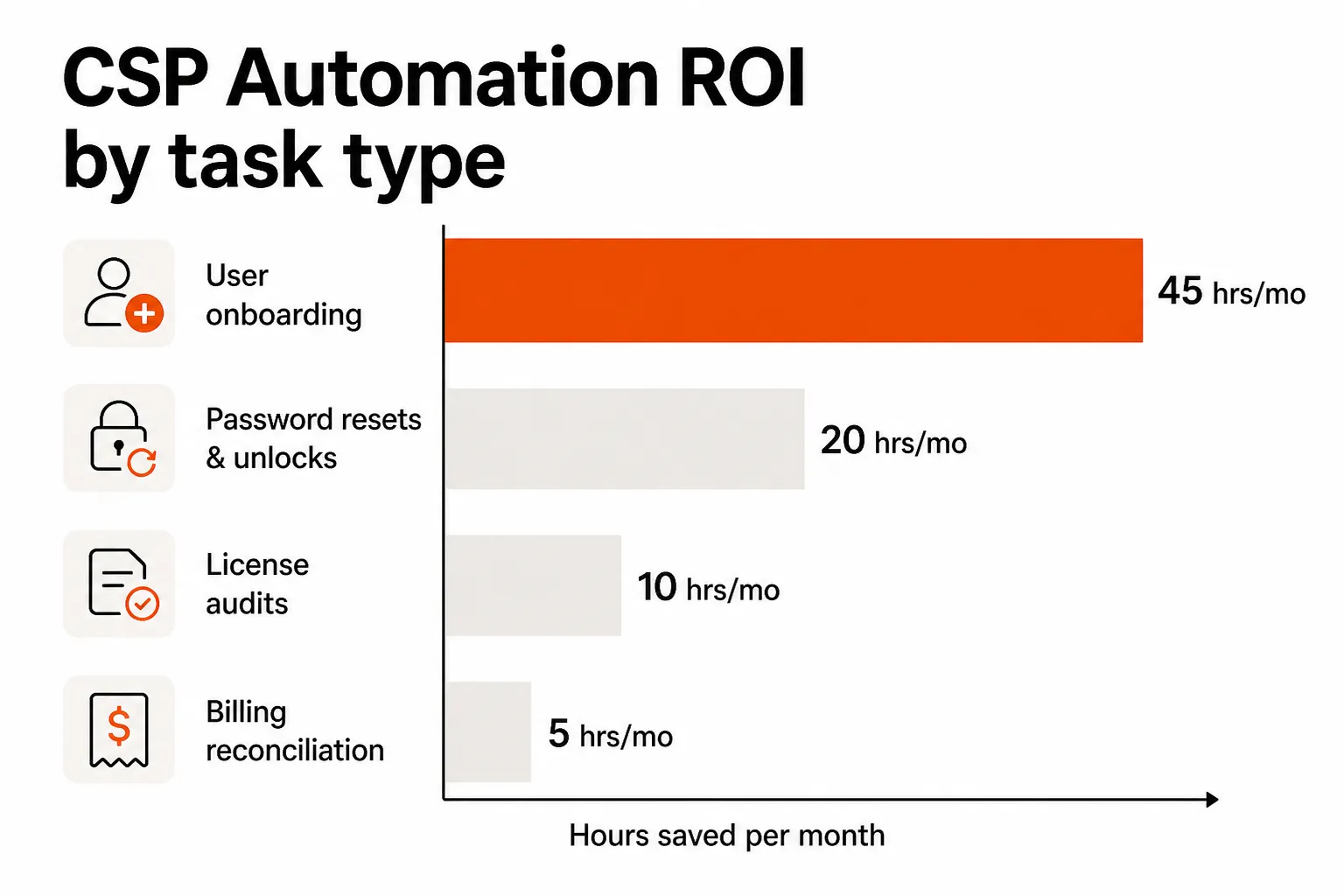
The ROI on automating this is the fastest of any CSP task. MSPs report that automated onboarding/offboarding pays back in under a month for any team processing 50+ provisioning events monthly across their customer base.
2. Password resets and account unlocks
These are the highest-frequency, lowest-complexity tickets in any MSP queue. "I can't log in" is L1 work that should resolve in seconds, not sit in a queue for 20 minutes until a tech notices it.
The math is brutal if you run it: a mid-size MSP handles dozens of password resets per week across their customer base. At 6-8 minutes of technician time per reset, that's hours of technician time per week on work that a properly connected system could resolve autonomously in under 60 seconds.
The unlock rate here is also where MSPs find the clearest case for agentic AI over rule-based automation - because the volume is high, the identity verification step is non-trivial, and the escalation path (when a reset should not proceed automatically) requires actual judgment.
3. License audits and optimization
MSPs regularly discover they've been paying for licenses no one is using. A customer overstaffs, employees churn, licenses get assigned and forgotten. Without automated audits, this runs until someone manually spots the discrepancy - often months later.
Community reports consistently put the discovered waste at $1K-$5K per customer per year once MSPs run their first automated license audit. At scale across 20+ customers, that's a meaningful number. Running a monthly automated audit via Partner Center APIs or through a platform like Rewst catches this in real time instead of retrospectively.
4. Billing reconciliation
Reconciling what Microsoft is billing against what you're actually billing customers is manual, tedious, and error-prone when done spreadsheet-to-spreadsheet. Automation pulls the consumption data, matches it to your billing records, and flags discrepancies - turning a multi-hour monthly task into a review of a generated report.
This isn't the flashiest automation win, but MSPs who get it working consistently describe it as one of the highest-leverage time recoveries they've made.
5. Security and compliance checks
MFA rollout, conditional access enforcement, retention policy verification, security alert triage - these are increasingly on the MSP's plate as customer security requirements get stricter. Without automation, they're ad-hoc and reactive. With automation, they run on schedule and surface deviations before they become incidents.
Rewst users cite security automation as a meaningful differentiator - the ability to run consistent security checks across every tenant on a schedule, rather than when someone asks.
The tools landscape
Rewst - the automation platform MSPs actually use
Rewst has become the community default for MSP automation, and the love is earned. It's purpose-built for MSP multi-tenancy, ships with prebuilt workflow templates for the most common CSP tasks, and has an integration ecosystem that covers PSA, RMM, M365, identity, and documentation tools.
The ROI numbers from Rewst's published case studies are real: Network IT Easy saves 300+ hours per month - that's enough to eliminate the need for a full-time hire. Microtime saves approximately 45 hours per month by automating user provisioning and offboarding. Clear Guidance Partners and Snap Tech IT describe the same pattern: tasks they "knew they should automate but never had time to" finally got done once Rewst lowered the barrier.
That last point is worth sitting with. For most MSPs, the bottleneck to automation wasn't ROI clarity - it was build time. Rewst didn't change the math on whether automation was worth it; it changed how much effort it took to actually ship it.
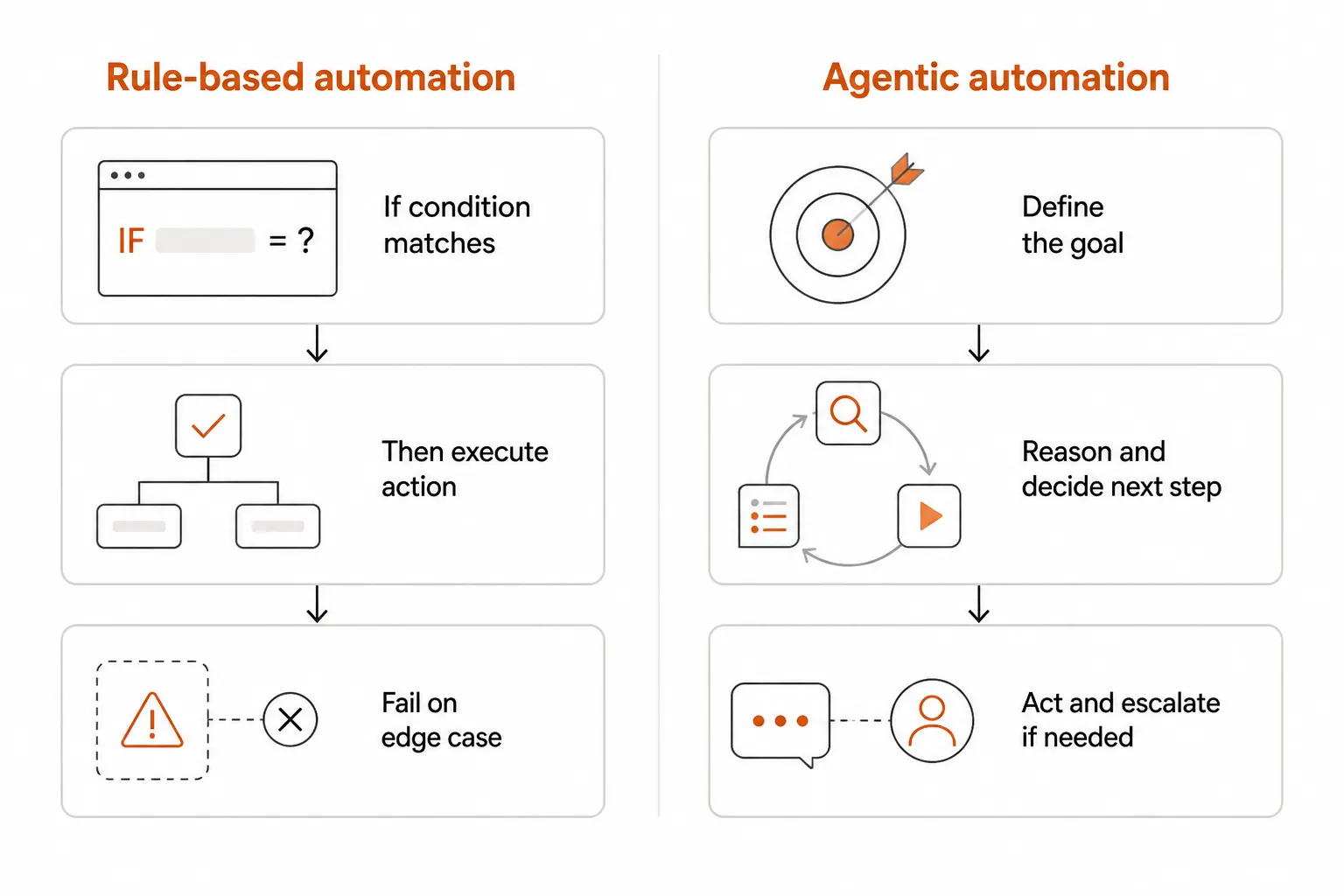
The honest limitation: Rewst is rule-based. It's excellent for the 90% of cases your rules cover. The other 10% - the edge cases, the novel situations, the tickets that land because a workflow didn't account for something - still require human attention. And Rewst doesn't touch your helpdesk queue.
"We knew we should automate [task], but we didn't have time to build it. Rewst made it easy enough that we finally did."
- Recurring theme across Rewst customer testimonials
PSA and RMM platforms - necessary but not sufficient
SyncroMSP, ConnectWise Automate, and Datto Autotask all include automation capabilities as part of their core offering. For MSPs already in these ecosystems, there's automation value to extract from what you're already paying for.
The honest community assessment: PSA/RMM bundles are good at service delivery, but they're not purpose-built for CSP automation. SyncroMSP is praised for being lightweight and all-in-one, but users consistently report that heavy M365/CSP automation requires layering a specialist tool on top. ConnectWise is well-established but seen as slow to adapt to cloud automation patterns. Autotask works well in the Kaseya ecosystem but isn't leading on CSP-specific features.
The pattern that emerges: PSA/RMM for core service delivery, a specialist automation platform for the CSP grunt work.
Microsoft Partner Center APIs - the foundation everything builds on
Microsoft Partner Center APIs are the low-level interface that most CSP automation tools (including Rewst) build on. Direct API access lets you programmatically manage tenants, subscriptions, licenses, and users without going through a third-party platform's abstraction layer.
For MSPs with development capacity, building directly against these APIs is an option - and some large MSPs do exactly that. For most, the time cost of building and maintaining custom integrations tips the scales toward a purpose-built platform.
Where AI is changing the math
Rule-based automation has been the standard for MSP CSP work for years, and it delivers real value. But it has a structural ceiling: every scenario needs an explicit rule, edge cases require manual handling, and the system breaks when it encounters something it wasn't built for.
Agentic AI changes the architecture.
Instead of "if user is created in Entra ID, create mailbox," an agentic system receives "onboard this user correctly given their role and the customer's existing setup" - and figures out the steps. It reads the customer's existing users and policies, infers the right group memberships, applies their license patterns, and flags ambiguity rather than failing silently or creating a mess.
The difference matters most at the edges:
- A user hired with a hyphenated last name that doesn't match the tenant's naming convention
- A contractor who needs dual-role access across two M365 groups
- An offboarding request where the manager hasn't approved mailbox archive yet
A rule-based system either fails or requires a custom rule for each. An agentic system reasons through it and escalates the ones it genuinely can't resolve without human judgment.
For the helpdesk side - the L1 tickets that rule-based automation doesn't touch at all - agentic systems change the economics entirely. A properly connected agent can receive a "I can't log in" ticket, verify the requester's identity against the directory, check the account state, reset the password or unlock the account, and close the ticket - all without a human touching it. At $0 marginal cost per resolution (vs. 10-15 minutes of technician time), the ROI math on high-volume L1 work gets interesting quickly.
The security bar is also worth naming directly, because MSPs hear "AI" and reasonably ask "what happens when it does something wrong?" The mitigation is structural: well-built agentic systems never invent data, verify identity before acting, scope their permissions tightly, and escalate rather than guess when they hit ambiguity. Every action is logged with reasoning. When something unexpected happens, the audit trail shows exactly what the agent saw and why it acted.
Rallied
Rallied is where the CSP automation and helpdesk automation conversations converge. It's an agentic AI technician built specifically for MSPs - it connects to your PSA, RMM, Microsoft 365, Entra ID, Okta, JumpCloud, and documentation tools, and autonomously handles the L1/L2 work that flows from CSP operations: password resets, account unlocks, onboarding, offboarding, access management.
The deployment story is deliberately different from what the market has burned MSPs with before. No 6-month implementation, no dedicated admin to build and maintain workflow rules, no forward-deployed engineer. The target is same-week deployment. You connect your stack, set permissions, and Rallied starts handling tickets.
Rallied is $150 a month for 2,000 credits, about 700 tickets in a typical month, and a ticket Rallied can't finish costs nothing.
For MSPs who've gotten to 40-60% automation with something like Rewst and are looking at what takes the next chunk of manual work off their plate - the helpdesk queue that automation doesn't touch - Rallied is the layer that handles it.
The ROI anchor Rallied uses is $7K-$15K/month in recovered technician time for MSPs running 50-100 hours of automatable L1 work per month. For a 200-400 ticket-per-month MSP with a standard 40-60% L1 mix, that's in the right ballpark.
Frequently Asked Questions
What does CSP automation actually mean for MSPs?
CSP (Cloud Solution Provider) automation refers to using tools and scripts - and increasingly, AI agents - to handle the repetitive operational work of managing Microsoft 365 tenants at scale: user onboarding, offboarding, license management, password resets, compliance checks, and billing reconciliation. Without automation, these tasks consume 20-30 minutes each and compound across every customer. With automation, they run in minutes or automatically on trigger. Tools like Rewst build rule-based workflows; platforms like Rallied handle them with agentic AI that can also resolve the helpdesk tickets that flow from them.
How much time can MSPs actually save with CSP automation?
The numbers vary widely by maturity and which tasks are automated, but the real-world reports are credible: Network IT Easy saves 300+ hours per month with Rewst; Microtime saves ~45 hours per month. MSPs focused on user onboarding alone commonly recover 16-25 hours per month for every 50 new hires they process across customers. The highest ROI tasks - user provisioning, password resets, license audits - tend to pay back automation investment in weeks, not months.
What's the difference between Rewst and an AI agent like Rallied for CSP automation?
Rewst is rule-based: you define explicit if-then workflows (if a user is created in Entra ID, create mailbox, assign licenses, add to groups). It's powerful and widely adopted, but every edge case needs a custom rule and rules require ongoing maintenance. Agentic platforms like Rallied take a goal-based approach: tell it to onboard a user correctly, and it reasons through the steps, adapts to edge cases, and escalates only when it genuinely can't resolve something. Rallied also handles the helpdesk tickets that Rewst doesn't - the inbound 'I can't log in' calls and password reset requests that hit your queue daily.
What CSP automation tasks should MSPs prioritize first?
User onboarding and offboarding is priority one - it's the highest-volume, most error-prone, and most time-consuming task, and automation ROI is fastest here. Password resets and account unlocks come second: they're high-frequency, low-complexity, and a significant drain on technician time when handled manually. License audits come third - MSPs commonly discover $1K-$5K per customer per year in unused seats once they run automated monthly audits. Billing reconciliation and compliance checks are worth automating too, but the first three deliver the clearest payback.
How much does CSP automation cost?
It depends on the tool. Rewst's pricing isn't publicly listed (you need to contact them for a quote). PSA/RMM platforms like SyncroMSP and ConnectWise Automate include basic automation as part of their monthly per-tech pricing. Agentic AI platforms like Rallied cost $150 a month for 2,000 credits, about 700 tickets in a typical month. Tickets Rallied couldn't finish or wasn't allowed to act on are never charged.
