SuperOps pricing explained: what MSPs and IT teams actually pay in 2026

TL;DR
SuperOps uses per-device pricing, which is simpler than most competitors. Two plans: Prime at $1.50/device/month (100-device minimum, $150/month floor) and Prime Plus at $3.00/device/month (150-device minimum, $450/month floor). Both include unlimited technicians. Prime Plus adds MDM for Apple and Android. Annual billing knocks 15% off. The per-device model strongly favors shops with more endpoints than technicians - a 5-tech team managing 100 devices pays $150/month on SuperOps versus $645-$795/month on a per-tech platform like Syncro.
If you're already running SuperOps as your PSA, Rallied connects directly to it to autonomously resolve L1 and L2 tickets - password resets, account unlocks, onboarding - for $150 a month, about 700 tickets in a typical month.
How SuperOps pricing works
Most PSA and RMM platforms have trained MSPs to expect per-technician seat pricing: you pay a monthly fee for every tech who logs in, so adding staff means adding cost. SuperOps breaks that pattern. You pay per endpoint managed, not per person managing them.
That one design decision has a bigger effect on total cost than any feature comparison, especially for shops that run lean on headcount relative to their device count.
Two plans cover both internal IT teams (ITSuite) and managed service providers (MSPSuite):
- Prime - the core unified platform: Windows, Mac, and Linux endpoint management, integrated ticketing, asset management, patch automation, network monitoring, and a built-in service desk. $1.50/device/month at the 100-device minimum tier.
- Prime Plus - everything in Prime plus mobile device management (MDM) for Apple and Android. $3.00/device/month (early-bird $2.50 through 2026) at a 150-device minimum.
No per-technician seat charges on either plan. An unlimited number of technicians can use the platform.
The full pricing table
Here's the complete pricing breakdown across fleet sizes, based on SuperOps' public pricing page:
| Plan | 100 devices | 101-500 devices | 501-1,000 devices | 1,000+ devices | Minimum |
|---|---|---|---|---|---|
| Prime | $1.50/device | $1.40/device | $1.30/device | $1.20/device | 100 devices ($150/mo) |
| Prime Plus | $3.00/device | $2.30/device | $2.10/device | $2.00/device | 150 devices ($450/mo) |
Annual billing saves 15% across both plans. Monthly cost at common fleet sizes:
| Fleet size | Prime (monthly) | Prime Plus (monthly) | Prime (annual) | Prime Plus (annual) |
|---|---|---|---|---|
| 100 devices | $150 | $450 | $1,530/yr | $4,590/yr |
| 250 devices | $350 | $575 | $3,570/yr | $5,865/yr |
| 500 devices | $650 | $1,050 | $6,630/yr | $10,710/yr |
| 1,000 devices | $1,200 | $2,000 | $12,240/yr | $20,400/yr |

One number worth internalizing: SuperOps' per-device rate drops as you grow. At 100 devices, Prime is $1.50/device. At 1,000 devices, it's $1.20/device - a 20% reduction just from scale. Platforms with flat per-tech pricing don't give you that.
Per-device vs per-technician: what the model means for your bill
The pricing model matters more than the rate. On a per-tech platform, every hire costs you a seat. On SuperOps, adding a technician costs nothing - only adding endpoints moves the needle.
"Coming from ConnectWise + a separate RMM tool, the per-device pricing model is refreshing. We're not paying per technician seat, so adding staff doesn't increase costs. At 250 endpoints, we're paying less than we were with the old stack, and we have more features." - Service Manager, MSP (G2)
Run the math for a 5-tech team managing 100 endpoints:
- Syncro (per-tech): $129-$159/tech/month × 5 techs = $645-$795/month
- SuperOps Prime (per-device): 100 devices × $1.50 = $150/month
That's not a rounding error. It's a $500/month gap - $6,000/year - before you factor in the RMM you'd still need with some competitors.

The flip side: if you have very few endpoints per technician - a small internal IT team managing a handful of devices - the per-device model stops looking as favorable. The 100-device minimum means you're paying for at least 100 endpoints regardless of how many you actually manage.
What's included in each plan
SuperOps includes the full platform - ticketing, RMM, asset management, and monitoring - in both plans. You're not buying modules separately.
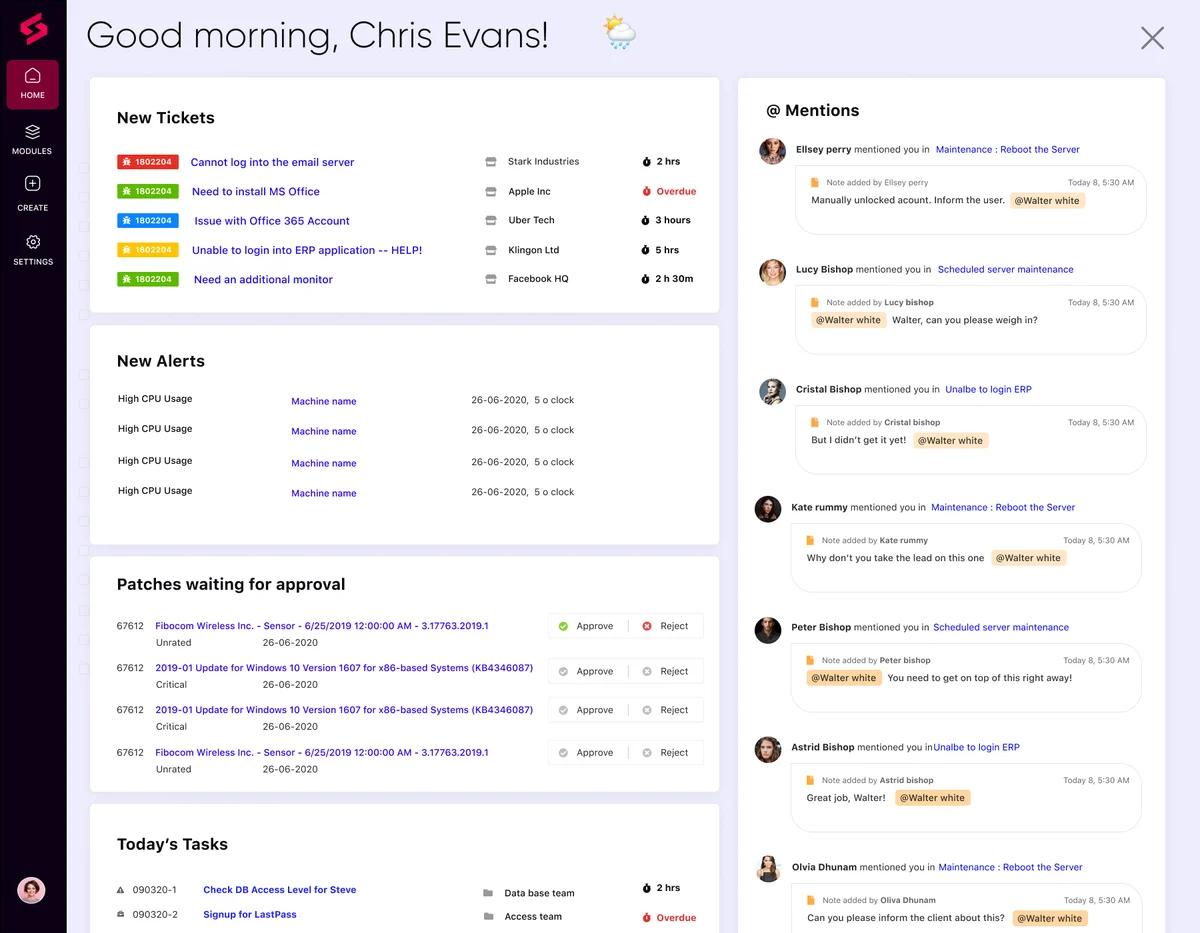
Prime includes:
- Unified endpoint management for Windows, Mac, and Linux
- Integrated service desk and ticketing (built-in, not a bolt-on)
- Automated patch management with compliance tracking
- Network monitoring and alerting
- Asset management and tracking
- Unlimited technician accounts
- AI-driven triage and automation features
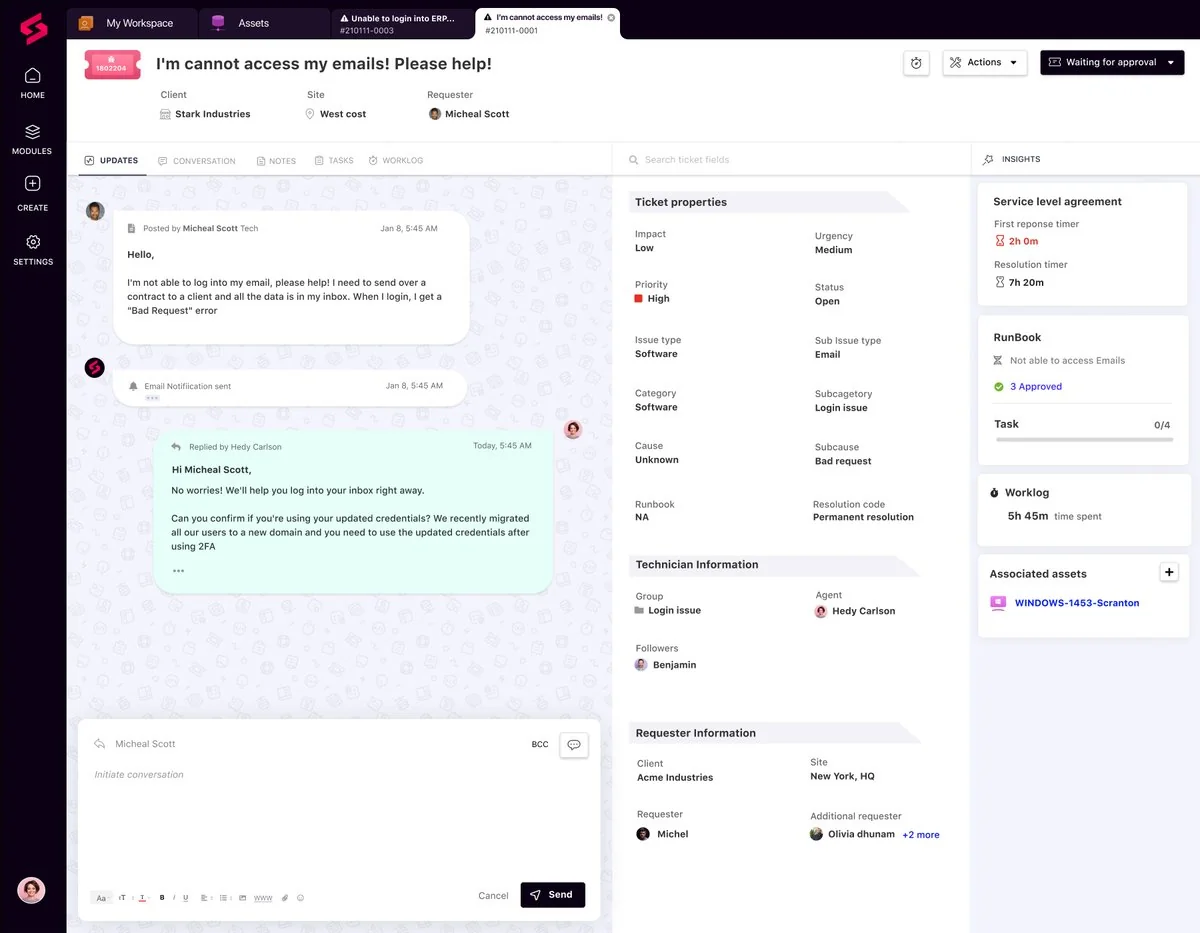
The native ticketing is one of the features reviewers consistently praise. It connects directly to the RMM layer so device context is already in the ticket when it opens - no tab-switching to pull up an asset record.

Prime Plus adds:
- Mobile device management (MDM) for Apple devices (iOS and macOS)
- Mobile device management (MDM) for Android devices
- All Prime features
MDM was one of the newer additions to the platform and reviewers note it's maturing fast. If your clients are iPhone-heavy or you manage Mac fleets for Apple-first businesses, Prime Plus is probably the right call. For shops where mobile is a small fraction of managed devices, Prime alone usually covers the job.
Annual vs monthly: the 15% discount
Annual billing is straightforward: commit to 12 months, pay 85% of the monthly rate. The savings are real and stack with fleet size.
| Plan + fleet | Monthly total | Annual total | Annual savings |
|---|---|---|---|
| Prime, 100 devices | $1,800/yr | $1,530/yr | $270 |
| Prime, 250 devices | $4,200/yr | $3,570/yr | $630 |
| Prime Plus, 100 devices | $5,400/yr | $4,590/yr | $810 |
| Prime Plus, 250 devices | $6,900/yr | $5,865/yr | $1,035 |
No long-term contracts required on either billing cycle. The annual commitment earns the discount but doesn't carry a penalty if you leave.
The overage math
If you exceed your committed device count, additional devices are billed at flat rates:
- Prime overage: $1.50/device/month
- Prime Plus overage: $3.00/device/month
Example: You've committed to 100 Prime devices and onboard a new client that brings your fleet to 115. The extra 15 devices cost $1.50 × 15 = $22.50/month added to your bill. The math is clean and predictable - no mystery tiers or volume ratchets.
The practical move is to size your commitment slightly above your current count if you're growing. Over-committing by 10-20% is usually cheaper than handling regular overage charges.
What reviewers say about SuperOps pricing
The 4.4/5 rating on G2 across 197 reviews is notable on its own - 92% of reviews are positive - but the pricing commentary is especially consistent:
"We went live in a single week. No multi-month implementation, no dedicated admin tax. The onboarding team walked us through connector setup and workflow mapping, and we were managing our full fleet by day five. Can't say that about most platforms in this space." - Operations Manager, Healthcare IT (G2)
The friction points worth knowing before you commit:
Integration depth. IT Glue and Hudu connectors are API-first rather than native, which means some shops end up writing glue code. If your documentation workflow lives entirely in one of those tools, verify the integration depth in a trial before switching.
MDM maturity. Prime Plus MDM features are newer than market leaders like Jamf. For shops managing hundreds of Apple devices for design or creative firms, it's worth testing the MDM depth specifically.
Fleet minimum. The 100-device minimum is real. If you're a smaller shop managing 60-70 endpoints, you're paying for capacity you don't use until you grow into it.
Who gets the best deal on SuperOps
The per-device model tilts the math in specific directions. Here's where it lands well and where it doesn't:
SuperOps works best for:
- MSPs and IT teams with more endpoints than technicians (the classic lean shop managing a big fleet)
- Teams consolidating from separate PSA + RMM tools, where the unified platform replaces two vendor invoices
- Organizations managing mixed Windows/Mac/Linux environments that need a single console
- Shops that value fast implementation - multiple reviewers cite live-in-a-week timelines vs. multi-month rollouts elsewhere
You might look elsewhere if:
- Your fleet is under 100 devices and you need a minimum commitment waiver
- You depend heavily on IT Glue or Hudu native integrations and can't work API-first
- You're managing 5,000+ devices and need white-glove enterprise implementation and SLAs
For more context on where SuperOps fits versus alternatives, see our SuperOps review and SuperOps vs HaloPSA comparison.
How SuperOps and Rallied work together
SuperOps handles the platform layer: endpoint management, ticketing, monitoring, patching, billing. What it doesn't do is autonomously resolve the ticket - a tech still has to open the ticket, read the context, perform the action, and close it.
That's where Rallied plugs in. Rallied connects natively to SuperOps PSA, reads incoming tickets, checks context across your connected systems (M365, identity providers like Entra ID and Okta, documentation in IT Glue or Hudu), and resolves L1 and L2 tickets without a tech touching them - password resets, account unlocks, onboarding, offboarding, access management.

The pricing is additive: SuperOps handles your per-device platform cost; Rallied is $150 a month, billed monthly, with 2,000 credits included. Each ticket costs 1, 3 or 8 credits depending on how much work the agent did on it, and tickets it couldn't finish are never charged.
For an MSP managing 250 devices and handling 100 automatable L1 tickets per month:
- SuperOps Prime: $350/month
- Rallied (100 tickets): $150/month, which covers about 700 tickets in a typical month (vs 100 tickets × 15 minutes × $35/hr fully loaded = $875 in technician time)
The combined platform cost is less than what your techs were spending on that one ticket category.
For more on where AI ticket resolution fits in the MSP stack, see our guides on reducing ticket volume with AI and MSP cost per ticket benchmarks.
Try Rallied
Rallied is an AI technician that integrates natively with SuperOps PSA. When a ticket lands in SuperOps, Rallied handles the L1 and L2 work that doesn't need a human in the loop - password resets, account unlocks, M365 provisioning, onboarding and offboarding workflows. The ticket closes without a tech ever opening it. Most MSPs go live in under a week with no workflow library to build.
For the wider picture, read Best MSP Software in 2026.
Frequently Asked Questions
Does SuperOps charge per technician?
No. SuperOps pricing is per device (endpoint), not per technician seat. You can have an unlimited number of technicians on both Prime and Prime Plus at no extra cost. This makes the math very different from platforms like Syncro, which charge per-technician seats.
What is the minimum monthly cost for SuperOps?
The minimum is $150/month on the Prime plan, which requires a 100-device minimum at $1.50/device/month. Prime Plus starts at $450/month with a 150-device minimum at $3.00/device/month (early-bird rate of $2.50/device is available through 2026).
Does SuperOps offer a free trial?
Yes. SuperOps offers a free trial with no credit card required. You can test the platform before committing to a paid plan.
Is annual billing worth it on SuperOps?
At a 15% discount, annual billing saves meaningful money. A 100-device Prime shop saves $270 per year ($1,530 annual vs $1,800 monthly). A 100-device Prime Plus shop saves $450 per year ($4,590 annual vs $5,400 monthly, or $3,825 at the early-bird rate). The savings compound with fleet size.
What's the difference between SuperOps Prime and Prime Plus?
Prime includes unified endpoint management for Windows, Mac, and Linux, plus integrated ticketing, asset management, patch automation, network monitoring, and unlimited technicians. Prime Plus adds mobile device management (MDM) for both Apple (iOS and macOS) and Android devices. Prime is $1.50/device/month; Prime Plus is $3.00/device/month (early-bird $2.50 through 2026).
