Datto RMM Review 2026: Features, Pricing, and Who It's Really For

TL;DR
Datto RMM is a mature, capable platform with genuinely best-in-class patch management, a unique native Microsoft 365 management module, and the tightest Autotask PSA integration in the market. If you're already running Autotask, it's hard to argue against staying in the ecosystem.
The catch: Kaseya's acquisition has introduced billing friction, three-year contract lock-in, inconsistent support, and a Web Remote tool that the community widely regards as broken. The platform's 4.5/5.0 rating on G2 across 700+ reviews is real - but read the negatives before you sign anything.
For MSPs not already in the Datto ecosystem, NinjaOne and Atera have closed the feature gap considerably and are worth a close look. For MSPs who want their RMM and their ticket-resolution AI to work together, Rallied connects directly to Datto RMM to run scripts and close tickets autonomously - the combination is worth knowing about.
What is Datto RMM?
Datto RMM is a cloud-based remote monitoring and management platform built specifically for managed service providers. It monitors endpoints across multiple client sites, automates patch deployment, provides remote access, and - unusually - includes a native Microsoft 365 management module that competes with standalone M365 admin tools.
Datto, now owned by Kaseya, positions the product as the "number one market leader" in MSP RMM. That claim is debatable, but the platform is genuinely one of the more mature options in the space, with 15+ years of development behind it.

The platform's cloud-native architecture means no on-premises hardware to manage, and Datto offers regional data centers in the US, Ireland, and Sydney for teams with data residency requirements. The 99.99% uptime SLA is standard for enterprise-grade platforms.
Who is Datto RMM actually for?
The honest answer here matters more than the marketing copy.

Datto RMM works best for MSPs already committed to Autotask PSA. The bidirectional integration - alerts becoming tickets automatically, time entries logged back, status syncing both ways - is genuinely seamless and hard to replicate with other RMMs. If you're on Autotask and evaluating RMMs, Datto is the easy choice from an integration standpoint.
It also fits MSPs who need compliance-grade audit trails, regional data residency, or tight backup integration with Datto SIRIS. The BSIMM security validation matters in regulated sectors (healthcare, finance), and the platform has the depth to support complex multi-site environments.
Where it doesn't fit: small MSPs managing under 50 endpoints who'll be overpaying for complexity they don't need; shops seeking month-to-month flexibility; teams coming from ConnectWise Automate who rely on the visual script builder; anyone who wants to evaluate before committing to a multi-year contract.
Core features
Monitoring and alerting
The monitoring engine is solid. Datto RMM provides real-time visibility across Windows, Mac, and Linux endpoints, with network topology mapping that renders a visual tree of client infrastructure - useful for quick triage when something goes down at a client site.
Alert rules are flexible: you can set thresholds, trigger automated responses, and customize per-client or per-device. The dashboards give you status donuts for offline devices, patch compliance, antivirus status, and software management - all on one screen.
The consistent G2 praise here is around minimal false-positive noise. That matters in an MSP environment where alert fatigue is a real productivity killer. Datto's tuning gives it a leg up over platforms that flood technicians with alerts they've been trained to ignore.
Patch management
This is where Datto RMM earns its keep. The patching engine is widely regarded as the best in the category - consistently praised in the r/msp community for accuracy, minimal failed deployments, and granular control.
You get automated deployment with compliance tracking, phased rollout with approval workflows, per-client and per-device schedules, zero-day vulnerability alerting, and audit-ready patch history reports. Cross-platform too - Windows, Mac, and Linux all covered.
The one real frustration: patching policies bundle approvals, reboots, and scheduling into one policy. You can't adjust the reboot window for one client without copying the entire policy and managing a parallel set. As one r/msp user put it:
"If you have a customer that is OK with the approvals and reboot options (ie prompt twice) but want it scheduled for 1pm instead of 2pm, you have to copy the policy and now your stuck managing approvals for another policy."
For large MSPs with heterogeneous client environments, this gets annoying fast. It's not a dealbreaker - but it's the kind of friction that adds up over time.
Remote access
Datto RMM ships with two remote access tools, which is where the confusion starts.
Agent Browser is the native agent-based option - fast, reliable, one-click launch from the dashboard, includes chat with the end user, file transfer, and command-line access. The problem: it doesn't work on macOS.
Web Remote is the HTML5 fallback - no agent required, works on any OS. The problem: it doesn't really work.
The community's verdict on Web Remote is damning:
"Web Remote is a catastrophe. If you are using their PSA you will have another tool to connect to device. We already see that they are lost at what they do. 2 software to connect to device and 1 is completely ignored." (r/msp)
Laggy screen sharing, issues with locked endpoints, missing session management features - most technicians end up falling back to Splashtop or RDP. Having two remote access tools and one that barely functions is, to put it charitably, an oversight that Kaseya appears to have deprioritized.
Microsoft 365 management
This is Datto RMM's most distinctive feature, and it's genuinely good.
No other RMM includes a native M365 management module like this. You get user onboarding and offboarding automation, password resets, MFA management, license assignment, multi-tenant support, and policy enforcement - all from within the same RMM console.
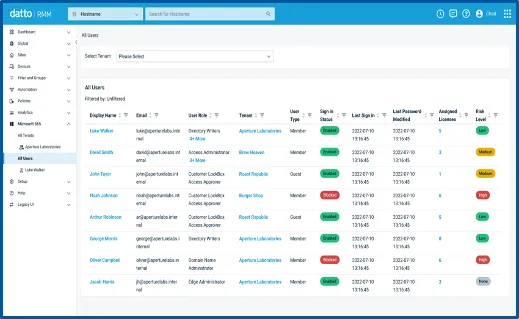
For MSPs managing multiple M365 tenants across their client base, the single-pane view across tenants, users, sign-in status, license assignments, and risk levels is a genuine time-saver. G2 reviewers who use it consistently rate it highly. The limitation is that some advanced M365 scenarios still require jumping to the Azure AD portal - but for 90% of day-to-day user management, the native module covers it.
Automation and scripting
Datto RMM supports custom scripts (PowerShell, Bash, batch, VBScript), conditional execution, and webhooks to third-party tools. There's a community script library with pre-built templates. The policy engine lets you build complex automation workflows.
What's missing - and what former ConnectWise Automate users notice immediately - is a visual script builder. You can execute scripts, but you can't build them in-platform, chain actions together, or invoke other RMM functions from within a script. One detailed r/msp review put it directly: "Coming from ConnectWise Automate, I really miss the script builder and engine. Without one you lose a lot of functionality."
This is where something like Rallied fills a real gap. Rallied integrates with Datto RMM to find the right endpoint, run approved scripts against it, and write the result back to the ticket in your PSA - closing the loop that Datto's scripting layer can start but doesn't finish on its own. More on that at the end.
Security and compliance
Datto RMM includes behavioral ransomware detection with automated alerting, and - if you're also running Datto SIRIS backup - automated recovery orchestration when a breach is detected. The BSIMM validation (top 20% of assessed firms) and compliance-ready audit logs make it a defensible choice for regulated industry clients.
The ransomware detection is proactive rather than reactive, with immutable backups preventing encryption-based data loss if SIRIS is in the stack. For MSPs in healthcare or finance, this combination carries real weight.
The Kaseya question
You can't review Datto RMM in 2026 without addressing the elephant in the room. The product itself is solid. Kaseya's stewardship of it is not universally praised.

The r/msp community threads are blunt. One partner who left after support failures described having a critical ticket open for over a year without resolution. Another described Kaseya's billing as "a headache": charges appearing before devices ship, credit memos routing to account managers instead of billing, months-long dispute resolution.
The most common sentiment in the community: "Datto RMM worked. Kaseya sucks."
Development pace is the other concern. The r/DattoRMM subreddit has a thread asking "Is Datto RMM development dead?" - hyperbole, but it reflects real frustration. Monthly releases are incremental. Feature requests sit open for years. NinjaOne is shipping faster and the community notices.
None of this means avoid Datto. But if you're evaluating it cold, these are real risks to weigh against the platform's genuine strengths.
Pricing
Datto RMM uses quote-based pricing - you won't find published tiers on their website. Pricing is per-endpoint, no per-user charges, and customized based on endpoint count, region, and feature set.
Standard partner contracts run three years. That's the number that keeps coming up in negative reviews. Three-year lock-in is aggressive even by enterprise software standards, and combined with Kaseya's reported billing practices, it's a risk that deserves a frank conversation with your sales rep before signing.
| Datto RMM | NinjaOne | Atera | |
|---|---|---|---|
| Pricing model | Quote-based | Tiered, public | Tiered, public |
| Contract terms | 3-year standard | Flexible | Month-to-month available |
| Pricing transparency | Low | High | High |
| Per-user charges | None | None | None |
| Free trial | No | Yes | Yes |
The all-inclusive model is a genuine advantage - monitoring, patching, remote access, M365 management, scripting, and 24/7 support are all in. You're not nickel-and-dimed on features. But the lack of published pricing means you're negotiating blind, and the contract length means mistakes are expensive.
PSA integration
The Autotask integration is where Datto RMM genuinely shines. Alerts auto-create tickets, time entries log back bidirectionally, and the PSA-RMM view gives you a single pane across infrastructure and service delivery.

If you're running ConnectWise, HaloPSA, or SuperOps, the integration is thinner. Datto works with other PSAs, but Autotask is the native first-class citizen. Non-Autotask MSPs will find NinjaOne or Atera offer comparable or better PSA integration for their platform.
What the platform is missing
To be direct about the gaps:
- No script builder. You can run scripts, but you can't build them visually or chain them with platform actions. ConnectWise Automate refugees feel this immediately.
- Web Remote is unreliable. Two remote access tools, one of which most technicians have quietly abandoned for Splashtop or RDP. This is a real day-to-day productivity problem.
- Patching policy rigidity. Can't decouple approvals, reboot windows, and scheduling into separate policies. Heterogeneous client environments get painful.
- No mobile app. Dashboard access is desktop-centric. Real-time alerts don't translate well to mobile.
- Slower development cadence. Kaseya's acquisition has slowed perceived innovation compared to NinjaOne's monthly feature shipping.
Verdict
Datto RMM is a genuinely strong platform with two legitimate reasons to choose it: the best patching engine in the category, and the only native M365 management module that competes with standalone tools. If you're running Autotask, the integration alone is worth serious consideration.
The honest version: this is a platform whose strengths were built by Datto and whose weaknesses have been introduced by Kaseya. Web Remote is a known problem nobody seems to be fixing. Billing disputes are well-documented. Three-year contracts are onerous even when the product is good.
Our take: If you're already in the Datto-Autotask ecosystem, stay - the integration value is real. If you're evaluating fresh, get NinjaOne and Atera demos before you sign anything, negotiate the contract length aggressively, and read the r/msp threads on Kaseya billing before you commit.
Try Rallied
One gap Datto RMM doesn't close: actually resolving the tickets its monitoring surfaces. Datto can find the broken thing, alert on it, and even run a script against it - but it doesn't autonomously diagnose and close the ticket. That's a different layer.
Rallied is an AI technician that integrates directly with Datto RMM to do exactly this. When a ticket comes in, Rallied reads it, finds the relevant endpoint in your Datto RMM instance, runs the approved script, logs the result back to the ticket in ConnectWise or Autotask, and closes it - without a technician touching it. Password resets, account unlocks, and access management all run autonomously, with approval gates on anything sensitive.
MSPs running Datto RMM have used Rallied to automate 50-100 hours per month of L1 grunt work on a $150 monthly plan that covers about 700 tickets in a typical month. It's built for teams that already have a solid RMM and want the resolution layer on top.
If your Datto RMM is catching problems faster than your team can close them, that's the gap Rallied fills. Most MSPs are live in under a week.
For the wider picture, read 7 Best MSP Automation Tools in 2026.
Frequently Asked Questions
Is Datto RMM worth it in 2026?
For MSPs already invested in the Datto/Autotask ecosystem, yes - the patching engine and native M365 management are genuinely best-in-class, and the PSA integration saves real hours. For MSPs starting fresh, alternatives like NinjaOne or Atera have closed the feature gap and offer better contract flexibility. The Kaseya ownership has introduced friction - billing issues, inconsistent support, slower development - that changes the calculus for newcomers.
How much does Datto RMM cost?
Datto RMM uses custom, quote-based pricing rather than published tiers. You contact their sales team for a quote based on endpoint count, feature set, and contract term. Standard contracts run three years. There are no per-user charges - pricing is endpoint-based. The all-inclusive model covers monitoring, patching, remote access, M365 management, scripting, and 24/7 support. Adding Datto SIRIS backup or EDR increases the total cost, and bundles are not always transparently priced upfront.
What PSAs does Datto RMM integrate with?
Datto RMM integrates natively and most deeply with Autotask PSA, including bidirectional ticket creation and automatic alert-to-ticket workflows. It also supports ConnectWise Manage and other PSAs, but the integration depth is noticeably weaker outside of Autotask. MSPs running HaloPSA or SuperOps will generally find better native integration in competing RMMs.
How does Datto RMM compare to NinjaOne?
NinjaOne has closed most of the feature gap with Datto RMM, and many MSPs cite it as easier to implement, faster to innovate, and less painful to buy (month-to-month options available). Datto's advantages are its patching engine depth, native M365 management module, and Autotask PSA integration - areas where NinjaOne doesn't quite match it. If you're not already in the Datto/Autotask ecosystem, NinjaOne is now a compelling alternative. If you are, migration friction is real and should factor into the decision.
Does Datto RMM have a free trial?
Datto RMM doesn't offer a self-serve free trial - you go through a sales process to get a demo and quote. This is typical for enterprise MSP platforms but means you can't evaluate it hands-on without committing to a conversation. Alternatives like Atera offer free trial access, which makes hands-on comparison easier before you sign a multi-year contract.
