Datto RMM patch management: how it works, where it shines, and where it stalls

TL;DR
Datto RMM patch management is one of the platform's standout features - consistently rated best-in-class on G2 for reliability, compliance tracking, and minimal failed deployments. One MSP documented 95% patch compliance across remote environments using it. The catch: Datto's policy structure bundles approval rules, reboot behavior, and scheduling into one object, so adjusting a single setting for one client group means duplicating the whole policy. Manageable at five clients; an admin tax at fifty. And automated patching still leaves a ticket queue full of humans confused about reboots, broken access post-update, and patch failures. If you're running Datto RMM, the patching engine is worth trusting - just build your policy structure deliberately from day one.
What Datto RMM patch management actually does
Datto RMM is a cloud-based remote monitoring and management platform built for MSPs. Its patch management module handles automated discovery, approval, scheduling, and deployment of patches across Windows endpoints - and, with the Advanced Software Management add-on, third-party applications too.
The basic loop: the Datto RMM agent checks for missing patches every two hours. When it finds them, it matches them against your configured patch policies. Depending on policy settings, patches are either auto-approved and scheduled or held for manual review. After deployment, the platform logs the result and updates your compliance reports.
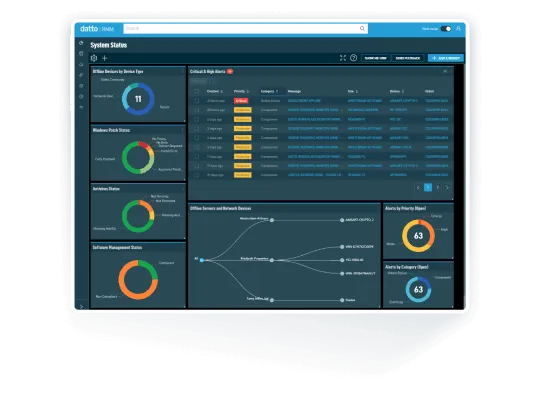
What makes this legitimately good: it's stable. MSPs running Datto RMM frequently cite the patching engine as their reason for staying, even when they're frustrated with other parts of the Kaseya-owned platform. G2 reviewers with 700+ reviews consistently score patch management as a strength, and Datto has earned Spring 2025 Enterprise recognition for this reason.
What it doesn't do: it doesn't patch your users' confusion. When a machine reboots unexpectedly at 2pm because a patch deployed, the ticket that follows is yours to handle. We'll come back to that.
The two policy types
Datto RMM offers two distinct approaches to patching, and choosing between them is the first real decision you'll make.
Windows Update policies are the simpler path. They govern standard Microsoft OS updates - security patches, cumulative updates, feature releases. Configuration is straightforward: pick which update types to apply, set a schedule, define reboot behavior. If you're primarily managing Windows endpoints and don't need granular per-client control, this is where to start.
Patch Management policies give you more control: phased rollouts, approval workflows, exception handling, compliance reporting by category. This is the right tool for heterogeneous client environments where different groups need different treatment - a law firm's endpoints have different patch tolerance than a construction company's job-site machines.
As of version 14.9.0, Datto RMM also supports fully automated deployment of Windows feature updates (major OS version upgrades) as part of the patching workflow - an addition that closed a meaningful gap for MSPs managing Windows 10 to 11 migrations.

Third-party patching: Advanced Software Management
Windows patching is the easy part. The harder problem is the long tail of third-party applications - Chrome, Adobe Reader, Zoom, VLC, whatever else has accumulated across your client environments.
Datto RMM addresses this through Advanced Software Management, an add-on that extends patch coverage to 200+ third-party applications. It handles automated vulnerability identification, patch discovery, and deployment - same basic loop as Windows patching, broader scope.
The pricing for Advanced Software Management is not publicly listed. You'll need to contact an account manager for a quote, which is a mild friction point if you're trying to scope out total costs before a renewal conversation.
For context on base pricing: Datto RMM runs $2.99 to $4.50 per endpoint per month depending on volume and contract length, with a minimum of 10 endpoints or $29.90 monthly. The three-year contract requirement is the detail most MSPs don't see until they're signing - worth knowing before you're in the conversation.
| Feature | Included in base | Requires add-on |
|---|---|---|
| Windows OS patching | Yes | - |
| Windows feature updates | Yes (v14.9.0+) | - |
| Third-party app patching (200+ apps) | No | Advanced Software Management |
| Compliance reporting | Yes | - |
| Phased rollout / approval workflows | Yes | - |
| Zero-day vulnerability alerting | Yes | - |
The policy multiplication problem
Here's the thing nobody mentions until you've been managing Datto RMM for a year: the policy structure has a design decision that starts costing you real time once you have enough client diversity.
In Datto RMM, a patch management policy bundles three things together: approval rules, reboot behavior, and scheduling. They live in the same policy object. You can't adjust one independently of the others.
In practice this means: if you have a client that's fine with your standard approval rules and reboot behavior but needs patches deployed at 1pm instead of your default 2pm - you copy the entire policy. Now you're maintaining two policies that are 99% identical, differing only in one field. Do that a dozen times across your client base, and you're managing a policy sprawl that's genuinely painful to audit or update consistently.
"Since approvals, rebooting and scheduling is all one policy, it makes it difficult to customize policies. If you have a customer that is OK with the approvals and reboot options but want it scheduled for 1pm instead of 2pm, you have to copy the policy and now you're stuck managing approvals for another policy." - r/msp, October 2025

The Datto RMM best practices documentation is worth reading before you start building policies. The takeaway: design your policy set deliberately with this constraint in mind. If you know you'll have clients needing different schedules, structure your policy hierarchy to minimize duplication from the start - it's much harder to untangle once you've got 30 policies in production.
This isn't a dealbreaker. NinjaOne and Atera face their own policy management trade-offs. But it is the #1 operational pain point Datto RMM users raise specifically about patching, so go in with eyes open.
Compliance reporting: where Datto actually delivers
Set aside the policy structure frustration for a moment, because the compliance reporting is genuinely good.
Datto RMM generates audit-ready patch history logs across all managed endpoints. You can see which patches are applied, which are pending, which failed, and when each action occurred - with enough granularity to satisfy compliance audits for HIPAA, PCI, and similar frameworks. The platform's BSIMM validation (top 20% of all first assessments) and AES/CBC encryption architecture give the compliance story some real weight beyond marketing language.
The dashboard view makes patch status digestible across a large client base: per-client compliance percentages, by-category breakdowns, and alert prioritization for critical gaps. The one documented real-world result: one MSP achieved 95% patch compliance across remote environments - which is a meaningful number when you consider that remote endpoints are historically the hardest to keep current.

If you're using Autotask PSA, patch-related alerts auto-create tickets and feed directly into your service board. For shops running the full Datto stack - RMM plus Autotask - this integration is the strongest argument for staying in the ecosystem. The ticketing loop is genuinely clean.
Where automated patching ends
There's an honest limit to what patch management automation covers, and it's worth naming it directly.
Datto RMM handles the deployment side: scanning, approving, scheduling, deploying, reporting. What it doesn't handle is the downstream chaos that follows - the user whose printer stopped working after Tuesday's patch, the person locked out of an application that got updated without notice, the tech who gets paged because a machine rebooted in the middle of a client presentation.
Those events generate tickets. And those tickets are almost always L1 work: check the patch log, identify what changed, revert or remediate, explain to the user. Time-consuming, repetitive, low-complexity - exactly the kind of work that doesn't need a senior tech to handle.

The split matters operationally. You can get to 95% patch compliance with Datto RMM's automated engine. You still need a plan for the 5% of endpoints that fail, and for every user who notices something changed.
Rallied for Datto RMM shops
MSPs running Datto RMM are already getting the patch deployment part right. The remaining friction is the ticket queue that patch deployments generate - and that's where Rallied fits.
Rallied is an AI technician that connects directly to Datto RMM alongside your PSA (ConnectWise, Autotask, HaloPSA, SuperOps), identity systems (M365, Entra ID, Okta, JumpCloud), and documentation (IT Glue, Hudu). When a patch-related ticket arrives, Rallied reads the RMM context, diagnoses what happened, and resolves it - password reset after an account lockout post-update, access restored after an application conflict, user walked through what changed and why - without a tech opening the tab.
Rallied is $150 a month for 2,000 credits, about 700 tickets in a typical month. For an MSP running Datto RMM across a mid-size client base, the tickets Rallied closes on patch-related issues alone tend to justify the cost pretty quickly.
Try Rallied
If you're running Datto RMM and the patch deployment side is working but the ticket queue still fills up after Patch Tuesday, that's exactly the gap Rallied is built for. It connects to Datto RMM alongside your PSA and handles the L1 work that automated patching can't - end-to-end, with every action logged back to the ticket.
See how Rallied works with Datto RMM or check pricing.
For the wider picture, read 7 Best MSP Automation Tools in 2026.
Frequently Asked Questions
What is Datto RMM patch management?
Datto RMM patch management is a built-in feature of the Datto RMM platform that automates the discovery, approval, scheduling, and deployment of patches to Windows endpoints across your managed client environments. It supports both Windows OS updates and, via Advanced Software Management, third-party application patches across 200+ apps. The Datto RMM agent checks for missing patches every two hours and deploys them according to your configured policies.
Does Datto RMM support third-party patch management?
Yes - Datto RMM supports third-party application patching through its Advanced Software Management add-on, which covers 200+ applications. Pricing for Advanced Software Management is custom and requires contact with an account manager. The base platform handles Windows OS and Windows Update patching natively without the add-on.
How much does Datto RMM patch management cost?
Patch management is included in the base Datto RMM subscription, which runs $2.99 to $4.50 per endpoint per month depending on volume and contract length, with a minimum of 10 endpoints or $29.90 per month. Third-party patching via Advanced Software Management carries an additional cost; you'll need to contact Datto for a custom quote. Note that Datto requires a three-year contract, which is worth factoring into your total cost of ownership.
What's the difference between Windows Update and Patch Management policies in Datto RMM?
Datto RMM offers two distinct policy types for patching. Windows Update policies manage standard Microsoft OS updates and are simpler to configure. Patch Management policies give you more granular control - approval workflows, phased rollouts, exception handling - but bundle approval rules, reboot behavior, and scheduling into a single policy object. This means adjusting the schedule for one client group without changing the other settings requires duplicating the entire policy, which can create admin overhead at scale. See Datto's patch management best practices for guidance on structuring policies.
How do I handle patch-related support tickets in Datto RMM?
Automated patching reduces the volume of patch-related issues, but it doesn't eliminate the tickets that follow - users confused by unexpected reboots, access problems after an update, or patch failure alerts that need investigation. MSPs running Datto RMM with Rallied can route those L1 tickets directly to an AI technician that reads the RMM context and resolves them end-to-end, without a human tech having to open the tab.
